


Kemo
3.87.63K Reviews
App Specs
- Version
- 3.6.1
- Updated On
- License
- Free
- Downloads
- 1,000,000+
- Developer
- NumLake Tech Limited
- Categories
- Tools
- Platform
- Android
Screenshots
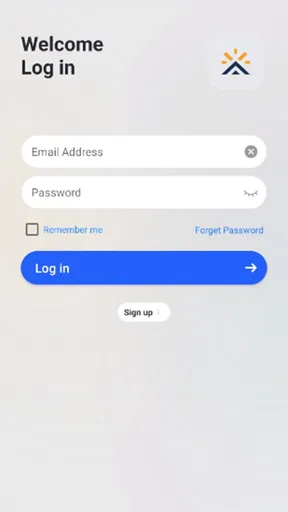
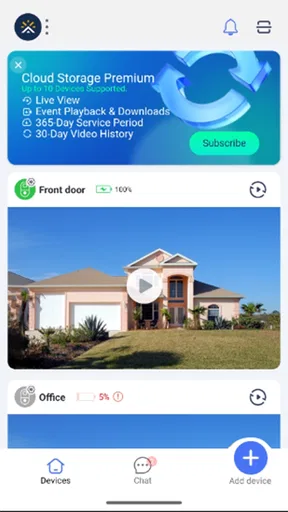
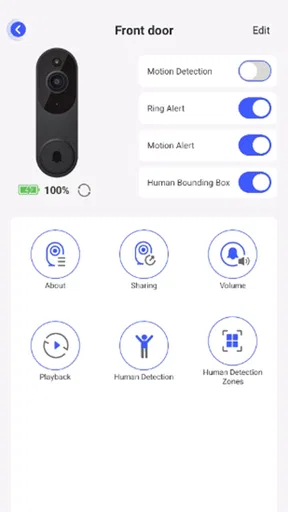
 Analysis by AppCompare
I find Aiwit easiest to judge by the job it is meant to do: it is a tools app for keeping an eye on visitors through a smartphone. That focus matters. It is not a general smart-home dashboard I would choose for every connected device; its appeal is more specific, and its usefulness depends on whether you have compatible doorbell or camera hardware to pair with it. For someone who wants to answer the door without being right beside it, that narrow purpose can be genuinely handy.
What the free price does—and does not—tell you
Aiwit is free to download, which makes trying the app less of a commitment than buying a paid utility upfront. It also offers in-app purchases ranging from $0.49 to $99.99 per item, so I would not assume that every related service or purchase is included at no cost. Those figures describe the available purchase range, not a promise that you need to spend money to use the basic app. I would check the purchase details shown on your device before confirming anything, especially if you are setting it up for someone else.
That distinction is important for a doorbell companion. The app itself is only one part of the experience: you also need the relevant hardware, and the value comes from whether the combination fits your home and routine. If you already own a compatible device, a free companion app may be a sensible place to start. If you are choosing equipment from scratch, compare the full hardware and service costs of the options you are considering rather than treating the app’s download price as the whole budget.
Getting Started with Aiwit
First things first, setting up Aiwit is a breeze. The app is available for both Android and iOS, making it accessible for most smartphone users. I grabbed it from the App Store, and within minutes, I was diving into its features. The interface is sleek and intuitive, which is always a plus in my book. You know that feeling when you open an app and immediately know where everything is? Yeah, that’s what you get here.
Features Galore
The app is packed with features that are both practical and easy to use. One of the standout elements is its seamless integration with smart devices. If you're into the whole smart home setup, this is like the cherry on top. It supports everything from cameras to sensors, making it a powerhouse for home automation. I synced it with my smart doorbell and, voila, it worked like a charm!
For everyday use, I would think about where the phone will be when a visitor arrives. If it is usually in another room, notifications can be more useful than simply having the app installed; if the phone is muted or left behind, the convenience naturally drops. A practical setup is to test the doorbell while you are at home, then repeat the check from the places where you are most likely to miss someone at the entrance. That small trial helps reveal whether the app fits your routine before you rely on it for deliveries or guests.
Another nifty feature is its real-time alerts. Imagine getting instant notifications when someone’s at your door. It’s like having a personal assistant keeping an eye on things, and the peace of mind it brings is just fantastic. Plus, the video quality is crisp, which is crucial for identifying who or what might be lurking outside.
Worth Reading Before You Choose

EA SPORTS FC Mobile 26 Is a Bigger Football Game, but It Takes Time

Flipboard Shows What News Apps Must Do Beyond the Feed

Switching to Android Auto Means Rethinking Your Driving Routine

Google Calendar Makes a Crowded Week Easier to Manage

Ludo King Makes the Most of the Minutes Between Plans

Baby Panda World Brings Quick Play to Modern Phones, but Its Game Library Feels Busy
Where the convenience pays off
A realistic benefit is being able to respond when you are occupied: you might be cooking, working in a back room, or getting ready to leave, and a visitor arrives before you reach the door. A phone-based view can help you decide whether to answer, ask the person to wait, or carry on with what you are doing. For a household that often receives parcels, that quick check may be more useful than a collection of broader smart-home controls.
I would also treat alerts as a prompt to check, not as a guarantee that every visit will be noticed. Phones can be silenced, connections can be unreliable, and people may be away from the device. Before depending on it for an important delivery, test the whole chain: the doorbell, the phone notification, opening the app, and seeing the visitor. That is more informative than judging the experience from a single successful setup.
User Experience
Using Aiwit is as straightforward as it gets. The app doesn’t bombard you with unnecessary ads or pop-ups, which is surprisingly refreshing. It’s all about what you need, right when you need it. Navigating through the app is smooth, and the response time is impressively quick. I’ve tried a couple of similar apps before, and let’s just say, not all of them hit the mark like this one.
For a fair comparison, I would put it beside the companion apps that come with other video doorbells, rather than beside broad home-automation platforms. Those larger platforms may make more sense if your priority is controlling many types of devices in one place. Aiwit’s more focused role is the stronger fit when the central task is seeing and speaking with a visitor from your phone. The trade-off is that a focused app is not automatically the right hub for someone who wants one interface for a whole home.
One useful habit is to decide who in the household actually needs access before treating the app as a shared front-door tool. If more than one person might answer, check the available account and device setup during installation and make sure everyone knows which phone should receive alerts. I would avoid assuming that sharing works in a particular way without checking the options in the app; a quick household test can prevent confusion when a visitor is waiting.
Notably, the app’s compatibility with different devices is worth mentioning. Whether you’re an iPhone person or an Android enthusiast, Aiwit plays well with both, ensuring a consistent experience across platforms. This is particularly great if you’re like me and switch between devices.
Trade-offs to consider before relying on it
The strongest limitation is also the simplest: the app’s value rests on having compatible hardware and a reliable connection at the moments you need it. Someone without a suitable doorbell or camera will not get the visitor-monitoring benefit from downloading the app alone. And if your main goal is a unified control center for a varied collection of smart devices, a broader platform may be a better match than a tool centered on visitor access.
There is also a practical privacy consideration with any camera-based entrance setup. I would think about the placement of the device and how its view affects people who approach the door, then use the controls available with the hardware and app in a way that suits the household. This is not a reason to avoid the app, but it is part of deciding whether a connected doorbell belongs at your entrance. A phone notification is convenient; it should not replace sensible decisions about who can view the camera or respond.
No visitor app can guarantee that a notification arrives at the perfect moment, so I would keep ordinary expectations in mind. If you need a system for a critical entrance or a business where missed visits have serious consequences, compare the complete device setup and its support arrangements with alternatives before committing. For casual home use, occasional extra loading or a missed alert may be tolerable; for a high-stakes use case, reliability matters more than a tidy interface.
Room for Improvement
No app is perfect, and while Aiwit is pretty close, there’s always room for improvement. One thing I noticed is that the app occasionally takes a second longer to load certain features, especially when multiple devices are connected. It’s not a deal-breaker by any means, but something worth noting if you’re a stickler for speed.
Additionally, while the app offers a multitude of features, a bit more customization wouldn’t hurt. Having the ability to personalize alerts or interface settings could elevate the user experience even further. But all things considered, it’s a solid app that delivers on its promises.
To reduce avoidable frustration, I would make a short test routine part of setup: check that the device is paired, trigger a visitor alert, and open the live view while standing somewhere you would normally be at home. If multiple devices are connected, try them one at a time before testing them together. That makes it easier to spot whether a delay is tied to one device or simply appears when the setup is busier, and it gives you a realistic sense of how quickly you can reach the view.
On Android, the app requires version 6.0 or later, so an older phone may rule it out before you begin. The current release is version 3.5.1, and the developer is NumLake Tech Limited. Aiwit has a 4.1 average from around 58,000 ratings, with roughly 7,100 written reviews and over 1 million installs. Those figures suggest that many people have tried it, but they do not tell me whether it will work well with a particular doorbell or in a particular home; compatibility and a hands-on test matter more for that decision.
Who is likely to get value
I would shortlist it if you already have compatible equipment, want to check visitors on a phone, and prefer a direct companion app over a more expansive smart-home system. It is also a reasonable candidate for households where people move around the home and may not hear a traditional chime, provided they keep a phone close enough to see the alert. Its Everyone content rating makes the app suitable for a general audience, though adults should still make the household decisions about camera access and device sharing.
I would skip it, or at least compare alternatives first, if you do not own compatible hardware, expect a free download to cover every possible service, or want one app to manage a wide range of unrelated smart devices. I would also be cautious if your phone is often on silent and you cannot build a habit of checking notifications. The app can make a doorbell more convenient, but it cannot make an unattended phone useful.
Final Thoughts
After spending some quality time with Aiwit, I can confidently say that it’s a robust tool for anyone looking to enhance their smart home setup. The app blends practicality with a user-friendly interface, making it a top contender in the market. Whether you’re a tech newbie or a seasoned pro, there’s something here for everyone.
So, if you’re in the market for an app that offers reliability, functionality, and a sprinkle of tech flair, give Aiwit a shot. It might just become your go-to app for home automation, as it did for me. Plus, with the ease of download and setup, what’s stopping you from trying it out?
My verdict is to try it when the hardware you own is compatible and the visitor-at-the-door use case is genuinely useful to you. The free download lowers the barrier to evaluating the app, while the in-app purchase range means I would inspect any paid option rather than assume it is necessary or worthwhile. As a focused way to check in on visitors, it has a clear purpose; as a replacement for every smart-home app or for a dependable phone that is always at hand, it is not the right choice. I would start with a simple real-world test and keep it only if that routine feels dependable in your home.
Pros
- User-friendly interface for easy navigation.
- Real-time alerts enhance security measures.
- Cloud storage options for video backups.
- Affordable subscription plans available.
- Supports multiple device connections.
Cons
- Limited features in the free version.
- Requires stable internet for optimal use.
- No offline video viewing available.
- Occasional delays in notification delivery.
- Some features locked behind paywall.
FAQs for Kemo
What is Aiwit and how does it work?
Aiwit is a versatile app designed to connect with smart devices, providing real-time monitoring and alerts. It works by pairing with compatible devices like security cameras or doorbells through Wi-Fi, allowing users to receive notifications, view live streams, and interact remotely via their smartphones. The setup is user-friendly, making it accessible for all skill levels.
Is Aiwit compatible with all smart devices?
Aiwit primarily supports devices from specific manufacturers, so compatibility may vary. It's important to check the app's compatibility list on the official website or app store listing before purchasing a device. Aiwit continuously updates its compatibility range, so keeping the app updated ensures access to the latest supported devices.
How secure is Aiwit in terms of data privacy?
Aiwit prioritizes user privacy by implementing end-to-end encryption for data transmission. This means that video feeds and alerts are securely transmitted between your device and the app. Additionally, Aiwit adheres to strict privacy policies and regularly updates security features to protect user data from unauthorized access.
Does Aiwit require a subscription for full functionality?
While Aiwit offers a free version with basic features, unlocking its full potential might require a subscription. Premium features often include advanced storage options, enhanced video quality, and additional device support. Users can choose plans based on their needs, and the app provides detailed information about each subscription tier.
What should I do if I encounter issues with Aiwit?
If you experience any issues with Aiwit, the first step is to check the app's FAQ section and user manuals for troubleshooting tips. For unresolved problems, contacting their customer support via email or chat is recommended. The support team is responsive and can guide you through resolving technical difficulties or device compatibility issues.


